Getting Started
Splash screen, intro slides, email or Google sign-in, verification, and first-time profile and template setup.
Resume Builder
Create professional resumes with 20 templates, ATS scoring, live preview, and PDF export — free on Android. Resume Builder by FluvoSoft helps students and professionals land their next role faster.
0+
Templates
0%
Free
0-tap
PDF Export
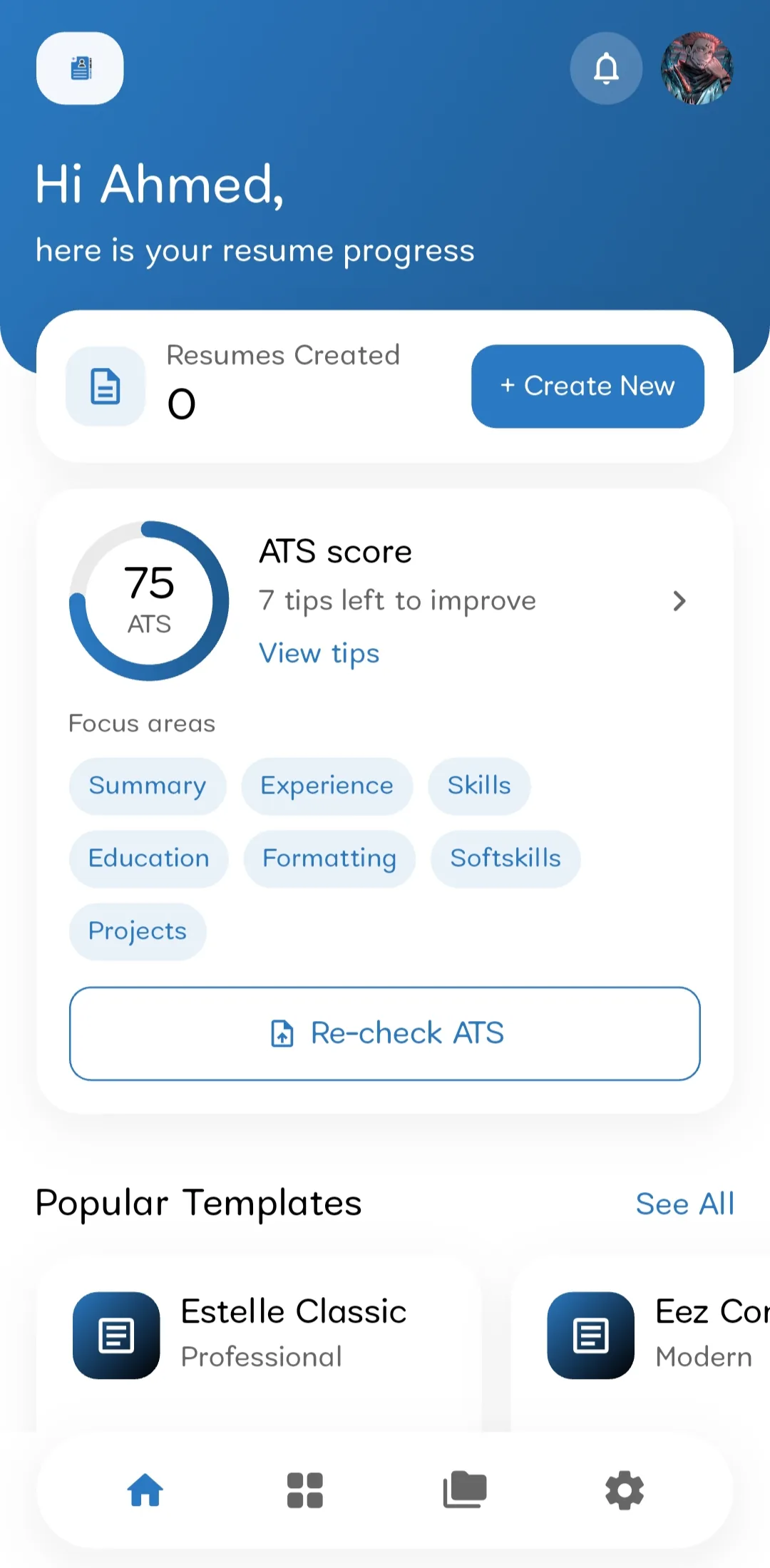
Home gives you a personalized greeting, resume count, latest progress with completion %, recent resumes, popular templates, and an ATS score card with actionable tips.
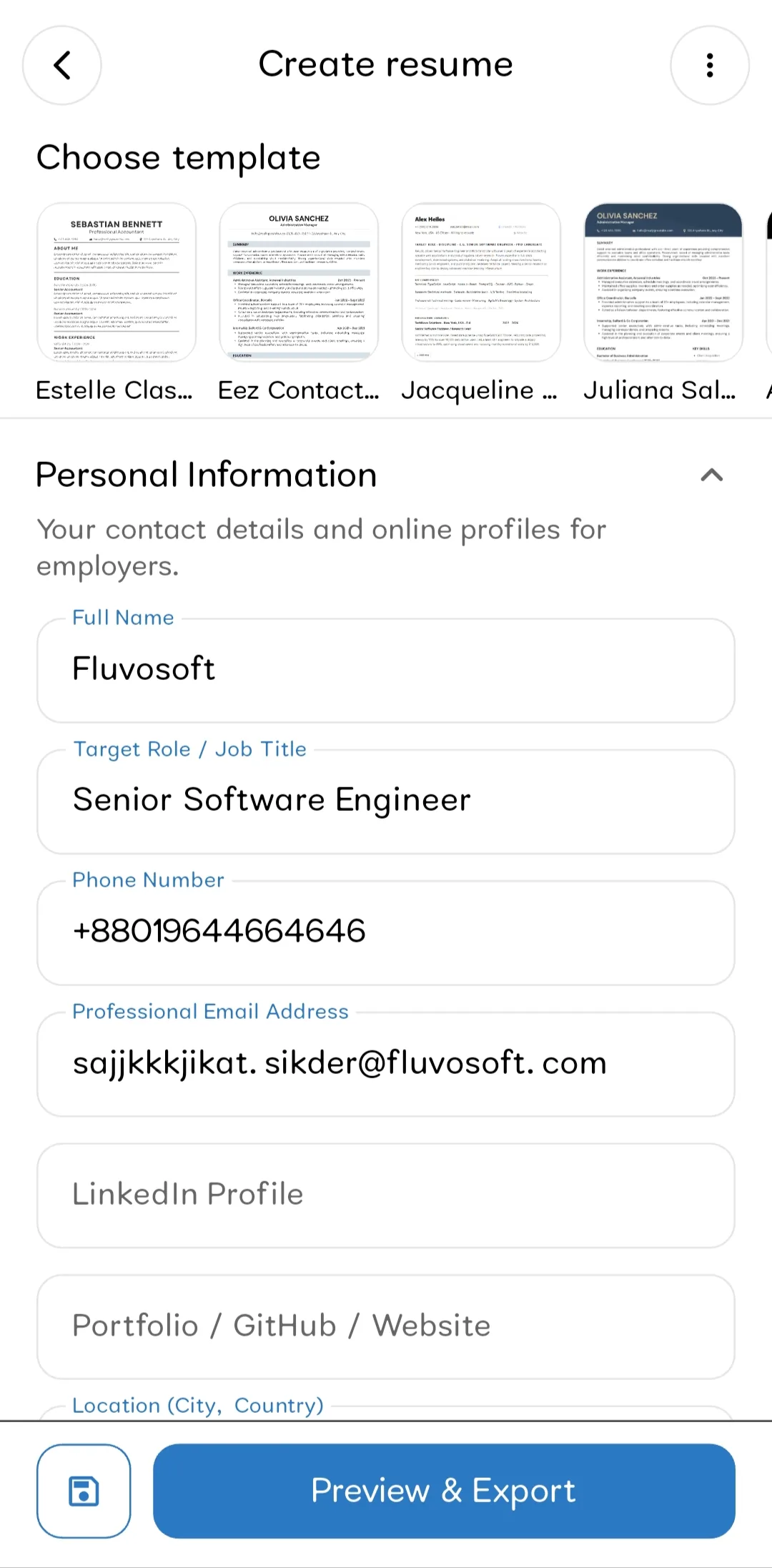
Open the editor to create or continue a draft: switch templates, auto-fill from profile or imported data, fill collapsible sections from summary to references, save drafts with completion tracking, and get writing tips along the way.
Home gives you a personalized greeting, resume count, latest progress with completion %, recent resumes, popular templates, and an ATS score card with actionable tips.
Open the editor to create or continue a draft: switch templates, auto-fill from profile or imported data, fill collapsible sections from summary to references, save drafts with completion tracking, and get writing tips along the way.
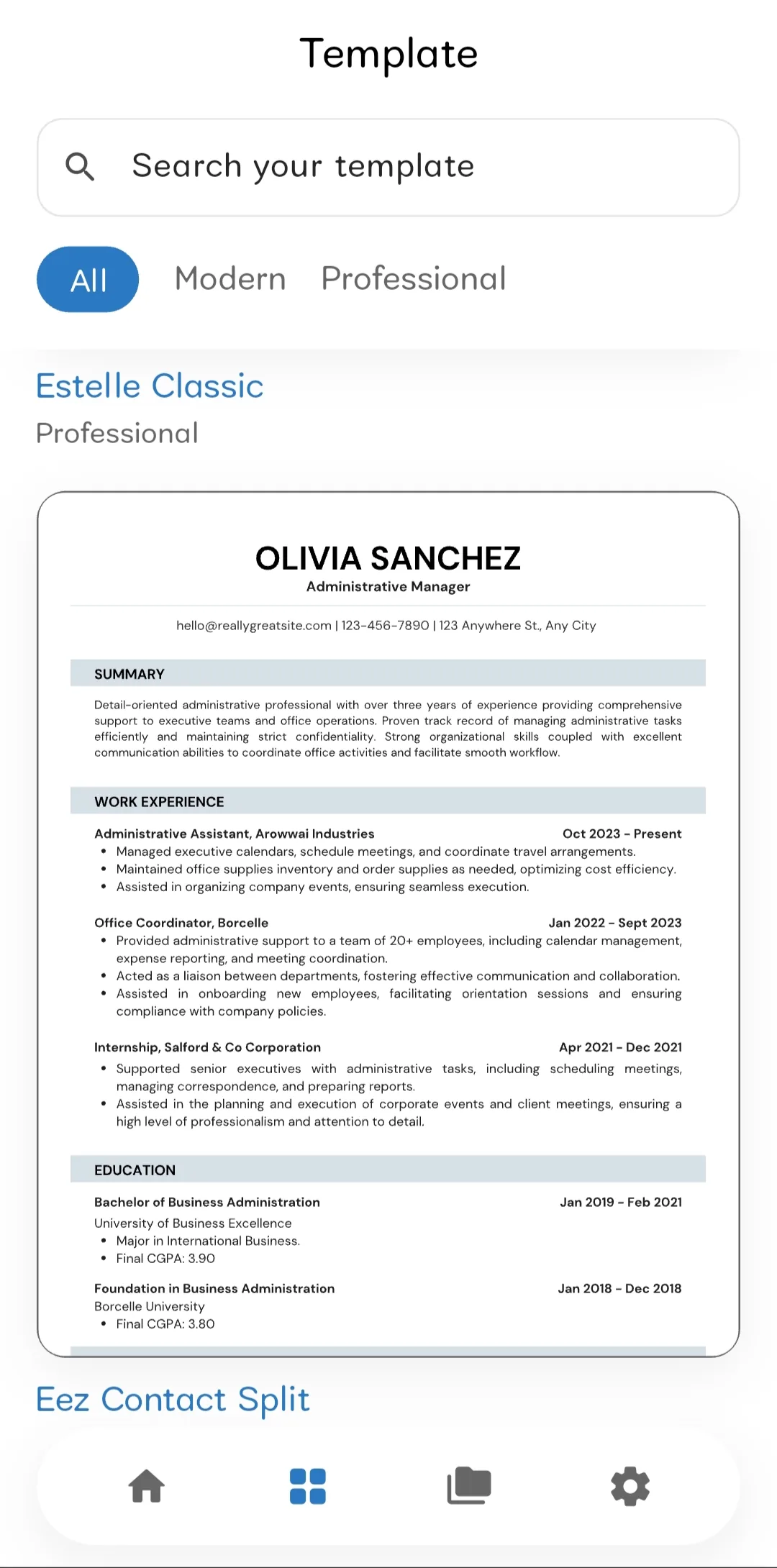
Browse 20 professional and modern layouts. Search by name or category, filter by category, and tap any template to start — all templates are free to use.
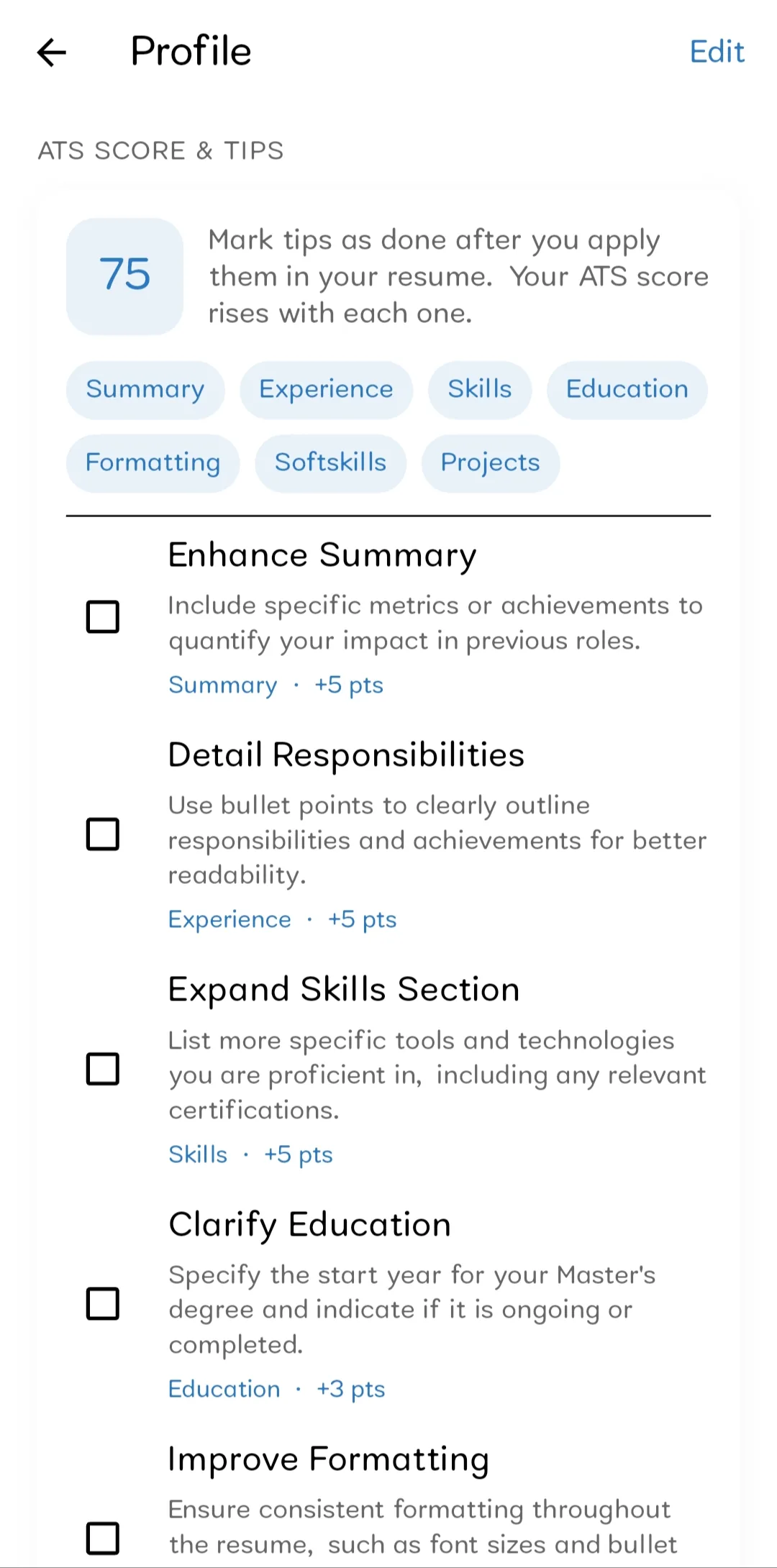
My Resumes keeps every document organized — search and filter by draft or complete, open to edit, and duplicate past resumes. Track your ATS score and improvement tips from Profile anytime.
Browse 20 professional and modern layouts. Search by name or category, filter by category, and tap any template to start — all templates are free to use.
My Resumes keeps every document organized — search and filter by draft or complete, open to edit, and duplicate past resumes. Track your ATS score and improvement tips from Profile anytime.
From sign-up and onboarding to templates, ATS scoring, and PDF export — built for Android.
Splash screen, intro slides, email or Google sign-in, verification, and first-time profile and template setup.
Greeting, notifications, resume count, latest progress, recent resumes, templates carousel, and ATS score card.
Browse 20 layouts, search and filter by category, and start a new resume with any free template.
Collapsible sections, auto-fill, draft save with completion %, writing tips, and template switching.
Live resume preview, download as PDF, and share through your device share sheet.
Search and filter your library, open to edit, duplicate resumes, and delete with confirmation.
Upload a PDF, get readiness scores, actionable tips with point boosts, and re-check anytime.
Edit profile details, preferred template, push notifications, inbox, and sign out.
Quick answers about sign-in, templates, ATS scoring, and how the free app works.
Sign up with email and password or use Google Sign-In. After signup, verify your email (resend is available). Your session stays persisted when you reopen the app. Sign out clears your session with confirmation.
New users see a splash screen with app branding, intro slides covering fast building, professional templates, and editing anywhere, then sign in or create an account. First-time setup collects your name, headline, location, phone, and preferred template.
Home shows a personalized greeting, profile avatar shortcut, notifications bell with unread badge, count of resumes created with quick Create New, latest resume progress (title, template, completion %, status), recent resumes, a popular templates carousel, and an ATS score card with tips and re-check actions.
Browse 20 professional and modern layouts. Search by name or category, filter by category, and tap any template to start a new resume. All templates are free to use. You can also set a preferred default template in Settings.
The editor supports personal information, profile photo (where the template allows), professional summary, skills, work experience, projects, education, certifications, achievements, publications, volunteer work, languages, interests, and references. Sections are collapsible with expand/collapse all, auto-fill from profile or imported data, writing tips, draft save with completion %, and options to clear fields or discard changes.
Yes. Use live resume preview while editing, then download as PDF or share through your device share sheet (save, email, messaging apps, and more). Full-screen ads may appear before preview or export in the native app.
My Resumes is your library of all saved resumes with status and completion. Search resumes, filter by All / Draft / Complete, open any resume to edit, duplicate a resume, or delete with confirmation.
On first use you can optionally upload an existing resume PDF. You get an ATS readiness score with focus areas (Summary, Experience, Skills, and more), actionable improvement tips with point boosts, and the ability to check off tips as you apply them. Imported content can pre-fill your profile and new resumes. Re-upload and re-check anytime from Home or Profile.
Profile shows your avatar, name, email, headline, location, phone, and ATS score with tips. Settings includes account overview, preferred template, push notifications on/off with a soft prompt, notifications inbox, and sign out with confirmation.
Yes. Resumes and progress stay with your account across sessions. Completion percentage is shown on Home, in the editor, and in My Resumes.
The native app may show banner ads on Home (one dismissible, one inline) and full-screen ads before preview or export. Ads help keep Resume Builder free for everyone.
Yes. All 20 templates, the resume editor, PDF export, ATS scoring, and cloud sync are free. There are no subscriptions or premium tiers.
Resume Builder has no monthly fees, no premium tiers, and no paywalls on essential features. Optional ads keep resume building accessible for everyone.
Resume Builder
Full access to templates, editor, ATS scoring, and cloud sync — at no cost.
| Feature | Resume Builder | Typical apps |
|---|---|---|
| Monthly subscription | None — $0 forever | $5–$15/mo |
| Resume templates | 20 included free | Limited on free tier |
| ATS score checker | Included | Often paywalled |
| PDF export | Included | Often paywalled |
The native app may show banner ads on Home — one dismissible and one inline. Ads help keep Resume Builder free for everyone.
Full-screen ads may appear before resume preview or PDF export in the native Android app.
Prices and ad placements may vary by platform and region. Resume Builder remains free — ads are the only monetization.
Resume Builder keeps your resume data secure and in sync across sessions. Here's a quick, plain-language view of what we collect and why. For the full policy, see fluvosoft.com/privacy.
Resume Builder (“the App”) is provided by FluvoSoft Ltd.. This section summarizes how we handle information when you use the App.
We do not sell your personal information. We process data to run the App, provide resume-building features, and keep your account and resumes in sync across sessions.
The App requests permissions only when a feature needs them:
Denying a permission may limit related features but core resume building remains available.
We share information with service providers only as needed to run the App, including:
These providers process information under their own privacy policies. See our full privacy policy for more detail.
If you created a Resume Builder account, you can request deletion of your account and associated personal data:
After deletion, we remove personal data from active systems within a reasonable period, typically within 30 days. Backup copies may persist for up to 90 days before automatic removal.
Effective July 16, 2026 · Last updated July 16, 2026
We may update this Privacy Policy section from time to time. Any changes will be posted on this page with an updated “Last updated” date.
Continued use of the App after changes means you accept the updated section.
Be among the first to know when Resume Builder launches. Enter your Gmail address and we’ll send you the release update.